
Getting Started with OVERCHESS
Wishlist, platforms, and the right headspace for infinite multidimensional chess.
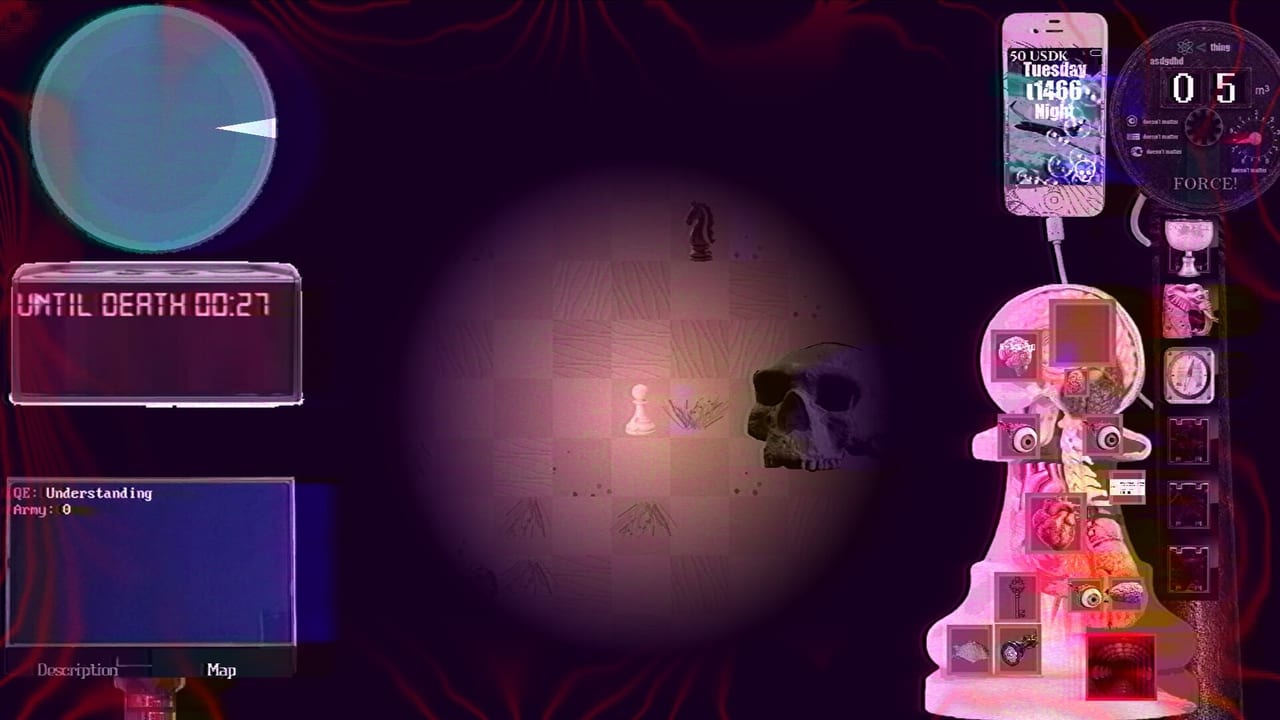
OVERCHESS is a single-player strategy adventure from ktotakops in which you are a regular pawn set loose against an entire open world of chess. The pitch on Steam is deliberately loud: infinite multidimensional boards, pocket dimensions, a pawn that can think and modernize itself, and a road toward passing 19,000 blocks while collecting friends, enemies, slaves, and worms into a personal army. Along the way you confront alcoholism, ludomania, diseases, crocodiles, alligators, and the occasional random quantum fluctuation that ends a run for no polite reason.
This getting-started page is for players who have seen a screenshot, a meme video, or the store capsule and want a calm onboarding before they download anything. It sits alongside the Guides Hub, the Demo guide, How to Play, Build an Army, and Pocket Dimensions.
What OVERCHESS is (and is not)
It is: an indie mix of strategy, adventure, open-world sandbox, satire, and a streak of horror. Tags players use on Steam include grid-based movement, turn-based tactics flavor, choices that matter, management, and surreal comedy. You are not playing a sterile FIDE tournament simulator.
It is not: a multiplayer ladder, a multiplayer raid game, or a live-service with weekly redeem codes. Confirmed platform focus is Windows via Steam. Developer and publisher are both ktotakops. Full release window: 2026. Demo: already live as a separate Steam app.
Treat marketing jokes as tone, not as literal checklist items. “Possibly a plot” and “cool music” appear in official copy for a reason — the game sells atmosphere as hard as rules.
Wishlist the full game
- Open the official store page: OVERCHESS on Steam (app 4615580).
- Sign into Steam and click Wishlist so launch discounts and release emails reach you.
- Optionally follow the developer’s community channels: Discord and X (@OVERCHESSNOST).
- If you want to play today, install the free demo from the same store family (details in the Demo guide).
Wishlisting does not replace playing the demo. The demo is the fastest way to learn whether the humor and systems fit your taste before 2026.
Platforms and technical baseline
| Fact | Detail |
|---|---|
| Full game Steam app | 4615580 |
| Demo Steam app | 5606670 |
| Release status | Upcoming (2026) |
| Platforms | Steam / Windows |
| Players | Single-player |
| Dev / Pub | ktotakops |
| multiplayer | None |
Minimum demo specs published on Steam are modest by modern standards (64-bit OS, roughly Intel Core i3-2100 / AMD FX-4300 class CPU, 4 GB RAM, DirectX 12, about 2 GB storage). Still verify your own machine against the live store page before complaining about hitching — indie builds change during demos.
First-hour mindset
Your first hour should not be a speedrun of 19,000 blocks. Use it to answer four questions:
- Do I enjoy the pawn’s agency? OVERCHESS sells a piece that thinks. If you wanted silent chess AI, you may bounce. If you wanted a weird sandbox protagonist, lean in. Expand on this in How to Play.
- Can I read the board as an open world? Squares are geography. Threats walk those squares. Pocket spaces fold extra boards into the journey — see Pocket Dimensions.
- Am I recruiting with intent? Friends, enemies, slaves, and worms are not flavor text alone. Start sketching composition ideas early with Build an Army.
- Can I laugh when the world is unfair? Official copy warns you may die to a random quantum fluctuation after carefully avoiding diseases and bad decisions. That is part of the satire.
Practical first-session checklist
- Wishlist the full game, then install the demo.
- Play one uninterrupted session of 30–60 minutes without alt-tabbing into spoilers.
- Note which hazards feel mechanical (alligators, diseases) versus thematic (alcoholism, ludomania).
- Write down any recruit you meet and whether they felt like friend, enemy, slave, or worm material.
- Stop while you still want another run — that craving is the real demo KPI.
How this wiki helps after onboarding
After the first hour, return to the Guides Hub and pick the deep dive that matches your friction point. Confused by space? Pocket dimensions. Starving for units? Army building. Still unsure how strategy and horror share one loop? How to Play. Still evaluating purchase intent? Demo guide.
We will not invent day-one redeem codes or fake patch IDs. When ktotakops publishes concrete 2026 launch notes, those facts will land in updates-style pages rather than being guessed here.
Community without spoilers
Steam discussions for OVERCHESS are lively and multilingual. Treat forum memes as entertainment, not as patched mechanics. Prefer primary sources: the store description, the demo build you personally installed, and developer posts on Discord or X. If a stranger claims a secret release day, check the Steam page before you rearrange your calendar.
Mature themes to expect
The developers flag stylized non-realistic violence involving chess pieces plus depictions of alcohol use and gambling. That matches the alcoholism / ludomania fantasy in the blurb. If those themes are a hard pass for you, the wishlist can wait — better to know from the store page than from a surprise mid-demo.
Next steps
- Finish this page’s FAQ.
- Open the Demo guide and install.
- After one session, read How to Play to name the systems you felt.
- Keep Build an Army and Pocket Dimensions bookmarked for your second and third sessions.
OVERCHESS rewards curiosity more than perfectionism. You are a pawn with a brain in a world that refuses to play fair. Getting started means accepting that premise — then walking the next square anyway.
Frequently Asked Questions
Quick answers about OVERCHESS, the demo, and this wiki.
Do I need to know competitive chess to enjoy OVERCHESS?
No. Knowing how pawns move helps the joke land, but the game is an open-world strategy adventure with satire and horror — not a tournament client.
Where do I wishlist OVERCHESS?
On the Steam store page for app 4615580. Sign in, hit Wishlist, and optionally follow Discord and X for developer news.
Is there a free way to try the game before 2026?
Yes. The OVERCHESS Demo (Steam app 5606670) is available; follow our Demo guide for install tips and expectations.
Will OVERCHESS support multiplayer?
Steam currently lists single-player only. Plan for a solo experience unless the developer officially announces otherwise.
What platforms are confirmed?
Windows via Steam for the demo and the announced full release window. Do not assume consoles until ktotakops confirms them.